3
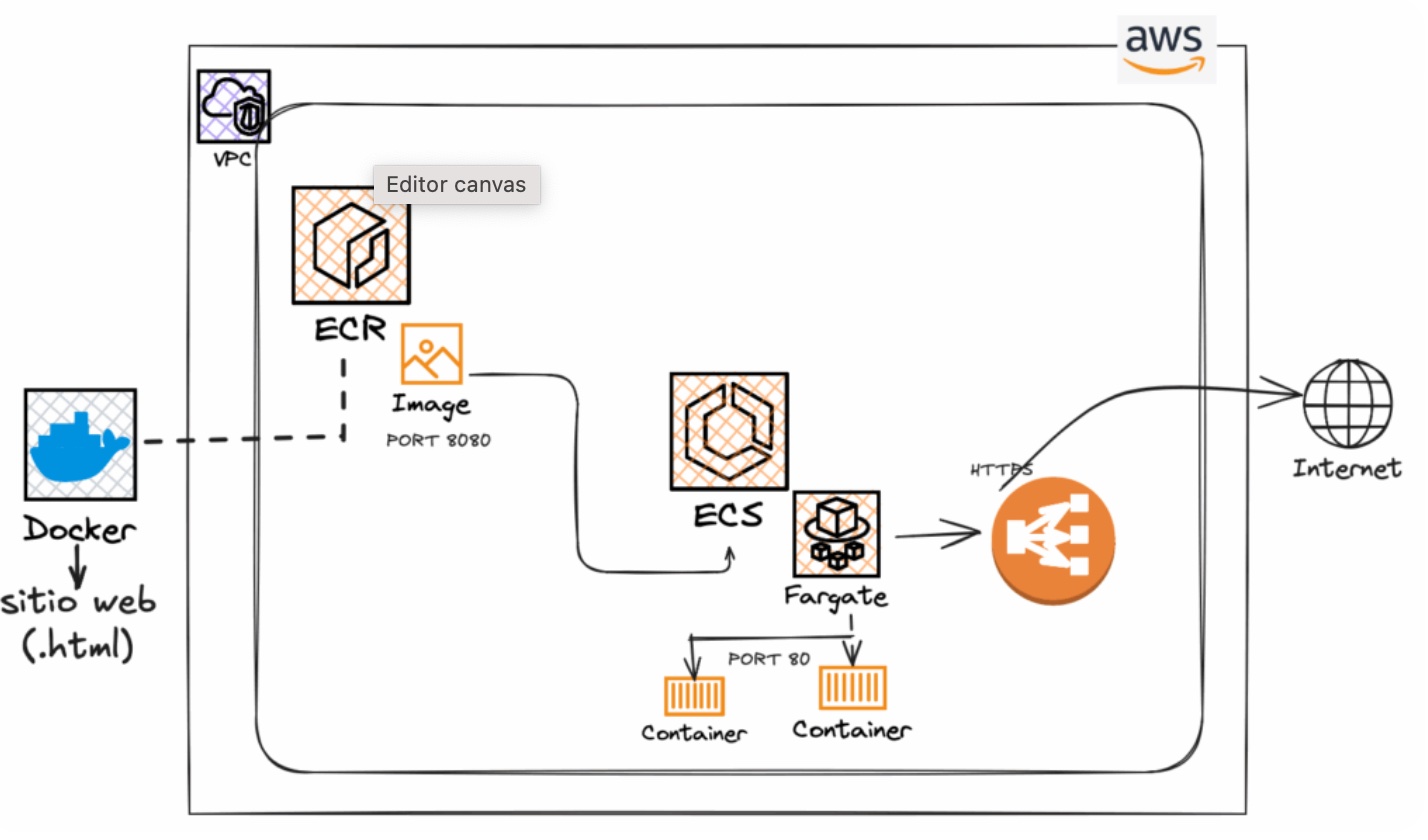
Website deployed in Docker with AWS ECS-Fargate Service and image Register in ECR
A website is deployed using Docker, its image is registered in ECR for subsequent deployment and configuration via AWS ECS - Fargate service.
Application Architecture and Tools
- Static Website (.html)
- Dockerfile
- AWS ECR Registry
- Service AWS ECS — Fargate service
- OrbStack console (Docker Engine)
- Developer Tool as VSCode IDE
Final Implementation
- Create the INDEX.HTML file, DOCKERFILE, and IMAGE.
- Upload the IMAGE to the repository in the AWS account's ECR.
- Deploy the image to ECS-Fargate.
- Expose and browse the website.
- If adjustments are needed, create a new version (REVISION).
- Finally, configure the application managed by ECS-Fargate to be exposed to the internet via a secure protocol using an Application Load Balancer.
github.com/connyval/Project-ECR_ECS_FARGATE
Graphical Technical Design
2
Application WP (2) tiers with two methods to deploy
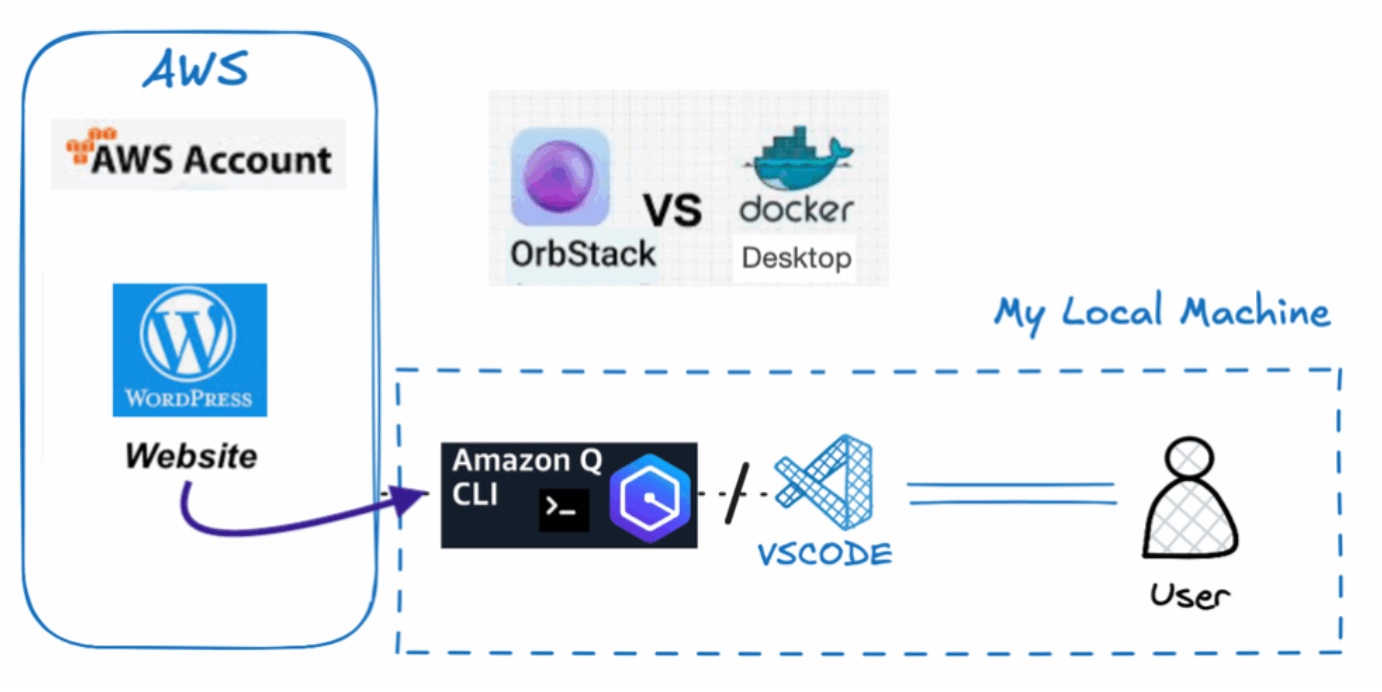
This project focuses on explaining a WordPress website implemented through Docker, using Dockerfiles managed via the OrbStack console (Docker Engine) to deploy the site locally on localhost. The next step involves migrating the content from my existing professional website hosted on AWS Cloud.
Additionally, the lab explores the use and benefits of Amazon Q, the AI-powered assistant, to support development and optimization tasks.
This lab includes: Solution Architecture, Solution Implementation, and Migration of existing WordPress Site Content.
Application Architecture and Tools
- WordPress IMAGE from DockerHub Registry
- Dockerfiles (DATABASE-FRONTEND), Docker-compose.yaml
- Local Machine MAC (Localhost)
- OrbStack console (Docker Engine)
- Developer Tool as VSCode IDE
- AI Tool as Amazon Q — Nova Model, Sonnet 4
Final Implementation
The website is composed of two layers: Database and Frontend.
- Database Layer – MySQL: Container: database — Port: 3306 (internal container port)
- Frontend Layer – WordPress (PHP Legacy App): Container: wordpress — Port: 80 (internal container port)
There are two possible approaches to IMPLEMENT this solution:
- Create a Docker Network to connect both containers.
- Create individual Dockerfiles for each component: Database (MySQL) and Frontend (PHP – WordPress). Build the Docker images from their respective Dockerfiles.
- Run the containers based on those images, specifying the required parameters (ports, volumes, and network configuration).
- In this approach, the Docker network is created automatically, so it is not necessary to define it manually. The entire deployment is managed through the docker-compose.yaml file.
- Once the site is running at http://localhost:8080/, configure it with the WordPress administrator username and password.
- Install the required plugin (e.g., All-in-One WP Migration), and go to the Import option to upload the file mysite-cloud.wpress.
- After uploading the mysite-cloud.wpress file, verify that the environment variables and PHP configuration extensions were successfully executed and remain persistent across the Docker container deployments.
- As a result, the website will be fully migrated and deployed within Docker containers, running locally in the localhost environment.
github.com/connyval
Graphical Technical Design
1
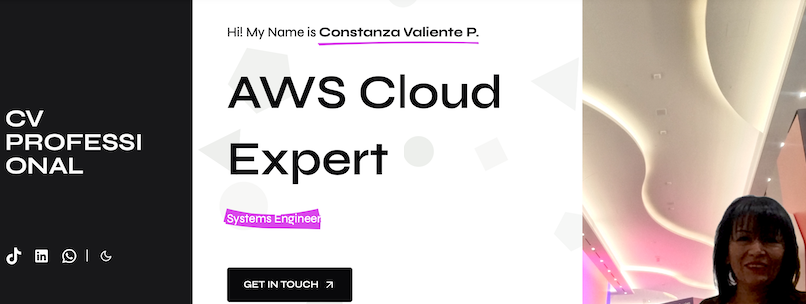
Professional Portfolio
This website is based on my professional experience and was implemented using AWS 2-tiers cloud architecture, enabling me to showcase my knowledge and skills while continuing to grow in my career as a cloud professional.
Application Architecture
- Amazon VPC (SUBNETS, SECURITY GROUPS, INTERNET GATEWAY)
- Amazon EC2 (linux) deploy DOCKER Containers — Webserver Apache
- AWS Certificate Manager
- Amazon Route 53
- Amazon Application Load Balancer
- CMS WordPress – Profile Website Template
Final Implementation
- Created an Amazon VPC network to isolate the project's resources, including public subnets across Availability Zones in the Virginia region.
- Configured properly NCLs in the public subnet and integrated an Internet Gateway to enable secure internet access for EC2.
- Deployed an Amazon EC2 virtual machine using a lightweight Linux AMI. Docker containers were launched using Docker Compose (Apache as webserver), including two containers for WordPress and MySQL database.
- Registered and configured the DNS zone and basic records in Amazon Route 53 to route traffic for the primary domain: ocvpprofessional.cloud.
- Set up an SSL certificate through AWS Certificate Manager for the primary domain, enabling secure communication over port 443 (HTTPS).
- Configured secure routing via Amazon Application Load Balancer, using the primary domain and HTTPS protocol. This setup also masked the public IP address, enhancing the security and privacy of the website.
Finally, launched the professional website in production using the latest version of WordPress CMS, applying a high-quality theme to reflect a strong professional image and brand online.
Website