3
My AI Assistant with Bedrock as a Serverless Project
My experience analyzed with AI to apply for the AWS Solutions Architect role: the goal was to build a SERVERLESS project, connect it to AI, and read a Knowledge Base (RAG) containing anonymized information from over 20 years of technology experience — in order to analyze and map career achievements against AWS principles, allowing an IT Recruiter to interact with my AI Assistant, ask questions about my professional background, and recognize a Senior-level IT profile aspiring to the AWS Solutions Architect role.
Final Implementation
FRONTEND
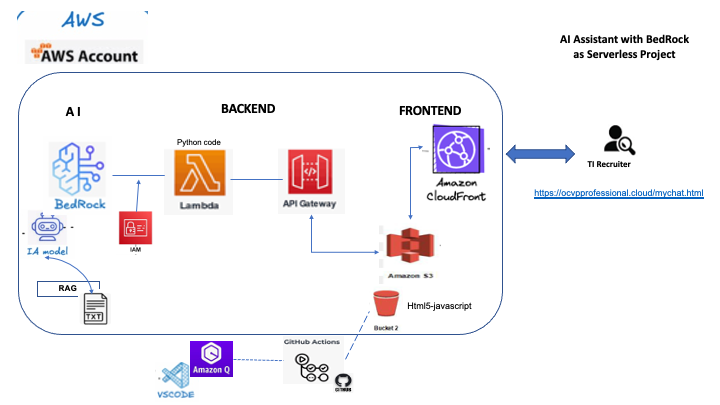
- HTML page built with HTML5 and JavaScript as the graphical interface for recruiters to interact with my AI Assistant.
- AI Assistant deployed at a URL that is part of my professional site (https://ocvpprofessional.cloud/mychat.html), hosted on S3.
BACKEND
- Knowledge Base (RAG): a plain text file (.txt) uploaded to S3, used as the data source containing my IT experience information.
- Amazon Bedrock: integrated to select the Amazon Nova Lite model as the AI engine powering this Virtual Agent (chatbot).
- AWS Lambda: Python function created as the compute unit that receives input from the frontend, sends it to the AI model, and returns the generated response — the model analyzes the query by mapping career achievements to AWS principles, enabling the recruiter to ask questions about my professional experience through the Virtual Agent.
- Amazon API Gateway: configured and exposes the endpoint that integrates Lambda with the frontend, receiving the recruiter's question and delivering the final response from the Virtual Agent (chatbot).
- IAM Role: execution role granting Lambda the required permissions to invoke Bedrock services (
bedrock:Retrieve and bedrock:InvokeModel).
- Amazon S3: hosts the professional site and the Virtual Agent page (
/mychat.html).
- Amazon CloudFront: final integration that delivers the Virtual Agent page over a secure protocol (HTTPS) under my professional domain, making it publicly accessible on the internet.
BONUS: In terms of AWS costs, this project incurs minimal charges — only Lambda invocations and AI model calls are billed. Usage is monitored via CloudWatch. Given its specific and limited use, costs remain negligible.
Graphical Technical Design
2
MCP Server for IA Chat with Amazon Q CLI / VSCode
First, what is MCP Server?
MCP, or Model Context Protocol, is an open-source protocol developed by Anthropic and supported by AWS. It acts as a 'universal translator' for artificial intelligence. AWS has integrated MCP to enable AI applications to access and use AWS tools, databases, and services. It operates with a client-server architecture, where clients (such as AI assistants) connect to MCP servers (which expose AWS data and services), allowing language models to interact securely and efficiently with the AWS environment.
An amazing tool! I implemented MCP to interact with an AI Chat using Sonnet models. Specifically, I used MCP for cost analysis and optimization, enabling me to investigate my resources and workloads, understand and analyze costs in detail, identify potential technical optimizations, and determine key aspects to monitor. This has become my powerful AI assistant for managing and controlling AWS cloud expenses.
Application Architecture and Tools
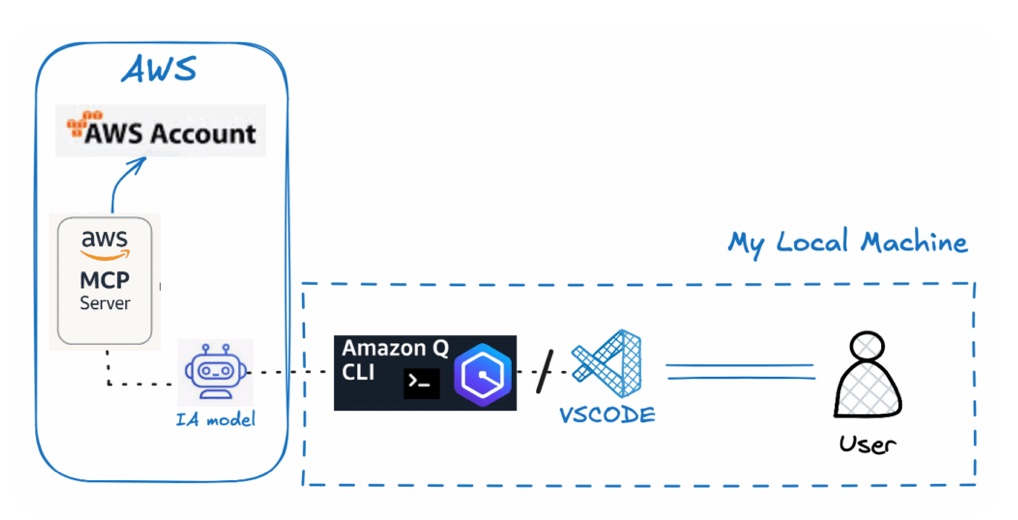
- AWS MCP Server — Sonnet Model
- AWS Q CLI and VSCode Framework Tool
- Amazon IAM: user, role, permissions to Cost Explorer API
Final Implementation
- Based on the AWS MCP Servers guide, the MCP for Cost Explorer analysis was selected.
- Amazon Q CLI was installed to enable functionalities, dependencies, and components on the local Mac machine.
- In the AWS account, a user and role were created, granting permissions for the Cost Explorer API to allow the user to connect to account resources.
- A profile was created with the user's credentials, including the access key and secret key, for use in the Terminal and VSCode.
- The JSON file located at /.aws/amazonq/mcp.json on the local machine was configured with the selected MCP server code, including the assigned user for connection to the AWS account.
- The MCP server was successfully integrated for use via Terminal and VSCode.
Finally, it was activated through AWS Q CLI in Chat, enabling natural language queries to the AI for AWS cost analysis, management, and optimization.
Graphical Technical Design
1
AI Assistant VSCode with AWS Bedrock
Currently, I integrated VSCode framework tool with Amazon Bedrock through an Artificial Intelligent Model, that it will allow me working and getting technical help by my personal IA assistant in the same workspace in VSCode. Additionally count with a professional teacher or mentorship to learning more about AWS Cloud.
Application Architecture and Tools
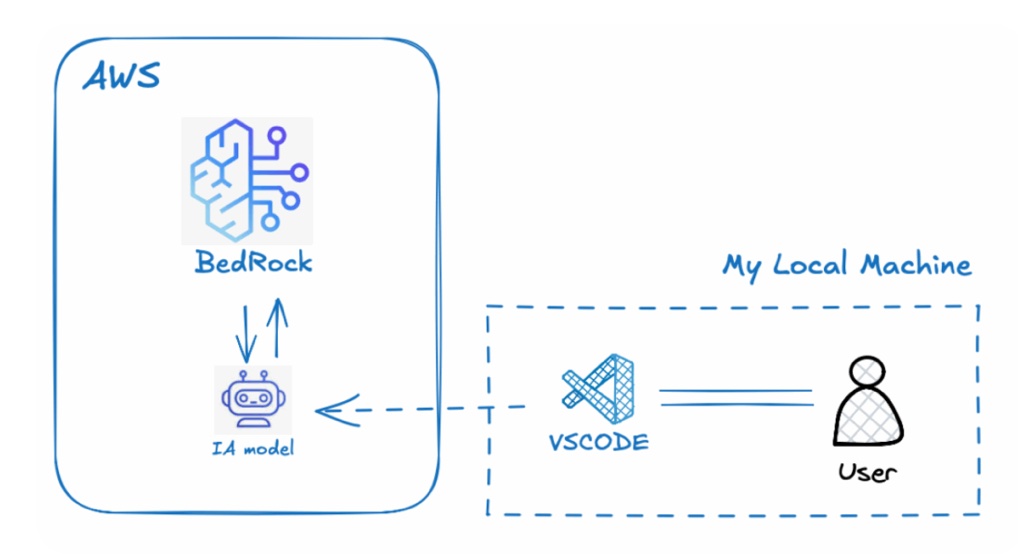
- VSCode Framework Tool
- Amazon Bedrock — Amazon provider — Nova Micro Model
- Amazon IAM — user, permission, role
Final Implementation
- In the Amazon account, the Bedrock service is enabled using the Nova Micro model, taking both the model name and ID.
- In the VS Code console, the CONTINUE extension is installed and activated, which enables the connection and creation of assistants.
- The AWS user is configured as a role within VS Code to allow connectivity to AWS.
- The config.yaml file is verified, ensuring it contains the model details, parameters, and pre-defined system prompt for the assistant.
- The config.yaml file is then copied to the default assistants directory of the CONTINUE module on the local machine — in this case, on Mac.
- With this setup, a new assistant is enabled and connected to AWS Bedrock within the VS Code interface and workspace, providing support and guidance on AWS Cloud technical information.
Graphical Technical Design